
This article expands on the original MultiSelector example by exploring the logic, patterns, and implementation approach behind enabling multi-value filtering in Acumatica – for both Modern UI and Classic UI.
Filtering data by multiple field values is a common requirement, but Acumatica developers often need more control than the standard selector provides. This article walks through a clean, extensible approach used in real-world implementations.
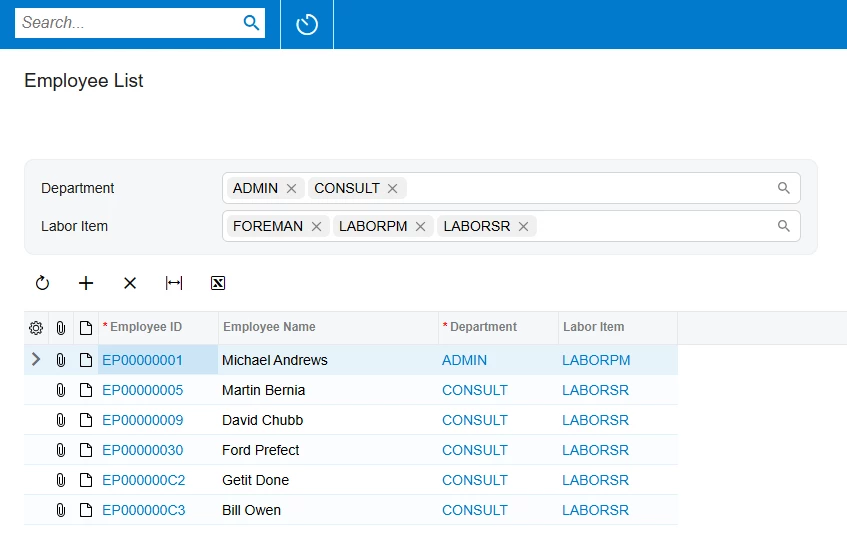
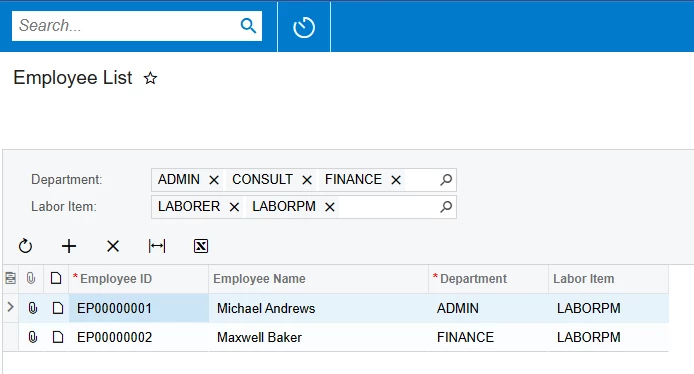
To allow multi-value selection, we declare two filter fields:
The key detail is:
ValidateValue = false must be set on PXSelector fields
This disables strict validation and allows multiple values separated by semicolons.
using PX.Data;
using PX.Data.BQL;
using PX.Data.BQL.Fluent;
using PX.Objects.EP;
using PX.Objects.IN;
using System;

namespace MyProject
{
   [Serializable]
   public class Filter : PXBqlTable, IBqlTable
   {
      #region DepartmentID
      [PXString]
      [PXSelector(typeof(SearchFor<EPDepartment.departmentID>),
                  typeof(EPDepartment.departmentID),
                  typeof(EPDepartment.description),
                  ValidateValue = false)]
      [PXUIField(DisplayName = "Department")]
      public virtual string DepartmentID {  get; set; }
      public abstract class departmentID : BqlString.Field<departmentID> { }
      #endregion

      #region LabourItemCD
      [PXString]
      [PXSelector(typeof(SelectFrom<InventoryItem>
          .Where<InventoryItem.itemType.IsEqual<INItemTypes.laborItem>>
          .SearchFor<InventoryItem.inventoryCD>),
                  typeof(InventoryItem.inventoryCD),
                  typeof(InventoryItem.descr),
                  ValidateValue = false)]
      [PXUIField(DisplayName = "Labor Item")]
      public virtual string LabourItemCD { get; set; }
      public abstract class labourItemCD : BqlString.Field<labourItemCD> { }
      #endregion
   }
}
The Data View Delegate processes values by splitting the multi-selector input into separate values.
private static bool MultiSelectorHasValues(string value, out IEnumerable<string> splittedValues)
{
   var hasValues = !string.IsNullOrEmpty(value);
   splittedValues = hasValues ? Regex.Split(value, "; ?").AsEnumerable() : null;
   return hasValues;
}
protected virtual IEnumerable employees()
{
   var filter = Filter.Current;

   var employees = new SelectFrom<EPEmployee>.View(this).Select().FirstTableItems;

   if (MultiSelectorHasValues(filter.DepartmentID, out var departmentIDs))
   {
      employees = employees.Where(e => e.DepartmentID.IsIn(departmentIDs));
   }

   if (MultiSelectorHasValues(filter.LabourItemCD, out var laborItemCDs))
   {
      var laborItemIDs = new SelectFrom<InventoryItem>
               .Where<InventoryItem.inventoryCD.IsIn<@P.AsString>>
               .View(this)
               .Select(laborItemCDs)
               .FirstTableItems
               .Select(i => i.InventoryID);

      employees = employees.Where(e => e.LabourItemID.IsIn(laborItemIDs));
   }

   return employees;
}
In Modern UI, multi-select is enabled via the decorator:
@controlConfig({ multiSelect: true })@graphInfo({
graphType: "MyProject.EmployeeListInq",
primaryView: "Filter",
})
export class EP203100 extends PXScreen {
Filter = createSingle(Filter);
Employees = createCollection(EPEmployee);
}
export class Filter extends PXView {
@controlConfig({ multiSelect : true })
DepartmentID : PXFieldState<PXFieldOptions.CommitChanges>;
@controlConfig({ multiSelect : true })
LabourItemCD : PXFieldState<PXFieldOptions.CommitChanges>;
}
<template>
    <qp-template id="form-Filter" name="1-1">
        <qp-fieldset id="fsColumnA-Filter" view.bind="Filter" slot="A">
            <field name="DepartmentID" ></field>
            <field name="LabourItemCD" ></field>
        </qp-fieldset>
    </qp-template>

    <qp-grid id="grid-Employees" view.bind="Employees"></qp-grid>
</template>
Classic UI implements multi-selection via PXMultiSelector.
<px:PXMultiSelector CommitChanges="True" runat="server"
    ID="edDepartmentID" DataField="DepartmentID">
</px:PXMultiSelector>

<px:PXMultiSelector CommitChanges="True" runat="server"
    ID="edLabourItemCD" DataField="LabourItemCD">
</px:PXMultiSelector>
The example intentionally keeps things simple for readability.
However, the query can be optimized:
Use .WhereAnd<…>() to build filtering into SQL at runtime instead of loading all employees into memory.
For large datasets, caching labor items can significantly improve performance.
This enhanced article provides deeper context and explanation behind the original MultiSelector implementation.
Using multi-select filters is a powerful technique that improves usability, flexibility, and analytical capability across both Classic and Modern UI.
If you have feedback or ideas for further enhancements – we’d love to hear from you!
You can read more on the Acumatica Community.
Get the latest insights on exponential technologies delivered straight to you
We use cookies to improve your experience on our site. By using our site, you consent to cookies.
Manage your cookie preferences below:
Essential cookies enable basic functions and are necessary for the proper function of the website.
Google reCAPTCHA helps protect websites from spam and abuse by verifying user interactions through challenges.
Google Tag Manager simplifies the management of marketing tags on your website without code changes.
Statistics cookies collect information anonymously. This information helps us understand how visitors use our website.
Google Analytics is a powerful tool that tracks and analyzes website traffic for informed marketing decisions.
Service URL: policies.google.com (opens in a new window)
Clarity is a web analytics service that tracks and reports website traffic.
Service URL: clarity.microsoft.com (opens in a new window)
Marketing cookies are used to follow visitors to websites. The intention is to show ads that are relevant and engaging to the individual user.
LinkedIn Insight is a web analytics service that tracks and reports website traffic.
Service URL: www.linkedin.com (opens in a new window)
You can find more information in our Cookie Policy and Privacy Policy.